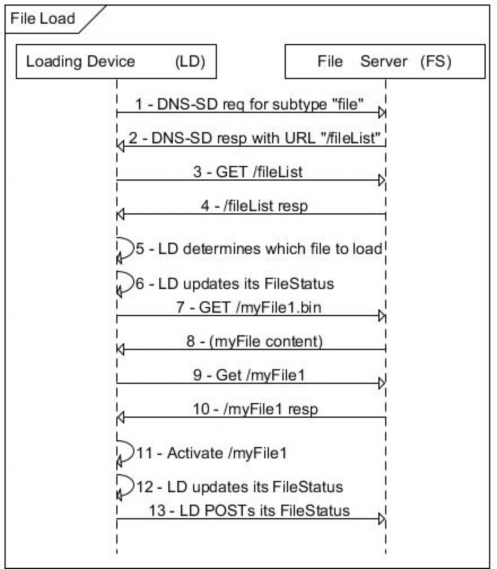
The flow diagram shown in Figure C.18 describes how a loading device (LD) queries a file server (FS) for a list of available files, loads a file from the FS, and verifies and activates the loaded file. It also describes how the LD may optionally maintain status of the file loading operation and reporting of same to the FS. The flow assumes network joining and device registration with service provider have already occurred.
Figure C.18—File load—flow diagram
Table C.20—File load: Flow description
Step | Description |
1 | The LD issues discovery requests to locate available FS (DNS-SD subtype “file”). |
2 | The LD has discovered the FS and obtained the URL of its FileList. |
3 | The LD queries the FileList to determine if there are any available files to be downloaded to the LD. An example FileList query: GET /fileList?s=0&l=5&type=0x000&mfId=37244&mfModel=123abc&mfVer=23.47.102 HTTP/1.1 Host: {hostname} Accept: application/sep+xml This query directs the FS to return the list of firmware files (type) from manufacturer 37244 (IANA PEN) LD model “123abc” whose version number is greater than (newer than) 23.47.102. As the LFDI and mfHwVer were omitted, they implicitly match any value that may have been specified in the File resources. |
4 | The FS responds to the LD with the FileList satisfying the query parameters. An example FS response: HTTP/1.1 200 OK Content-Type: application/sep+xml Content-Length: {contentLength} <FileList all="2" href="http://host1/fileList" results="2" xmlns="urn:ieee:std:2030.5:ns"> <File href="http://host1/myFile1"> <fileURI>http://host1/myfile1.bin</fileURI> <mfID>37244</mfID> <mfModel>123abc</mfModel> <mfVer>23.48.1</mfVer> <size>128000</size> <type>00</type> </File> <File href="http://host1/myFile2"> <fileURI>http://host1/myfile2.bin</fileURI> <mfID>37244</mfID> <mfModel>123abc</mfModel> <mfVer>23.47.103</mfVer> <size>136000</size> <type>00</type> </File> </FileList> The FS reports that it has two files which match the initial query for firmware/manufacturer PEN 37244, model “123abc,” and are newer than version 23.47.102. The first entry in the list (mfVer 23.48.1) is the latest version. Note: No activation time was provided. |
5 | The LD examines the results from the FileList query and determines which, if any, of the File resources should be loaded. The LD selects the latest file available /myFile1 with version 12.48.1 |
6 | The LD updates its FileStatus resource. |
7-8 | The LD loads /myFile1 with version 12.48.1. Note: This exchange will often be accomplished with multiple HTTP(S) request/response (using the Range and Content-Range entity headers). |
9 | Recall that no activation time was included in the original /myFile1 obtained by the LD from the FileList. Whenever an LD loads a file with an unspecified activateTime, the LD will continue to poll to acquire a file activateTime (interval and retry discussed above). The LD will periodically issue the following request: GET /myFile1 HTTP/1.1 Host: {hostname} Accept: application/sep+xml |
Table C.20—File load: Flow description (continued) | |
Step | Description |
10 | The FS responds with /myFile1. HTTP/1.1 200 OK Content-Type: application/sep+xml Content-Length: {contentLength} <File href="http://host1/myFile1" xmlns="urn:ieee:std:2030.5:ns"> <activateTime>3763784682</activateTime> <fileURI>http://host1/myfile1.bin</fileURI> <mfID>37244</mfID> <mfModel>123abc</mfModel> <mfVer>23.48.1</mfVer> <size>128000</size> <type>00</type> </File> Note that, this time, an activateTime is provided within /myFile1. If there is not an activateTime contained in /myFile1, the LD continues to poll for activateTime. |
11 | The LD waits until the activation time specified for /myFile1 is reached, then places the file into the activated state. In the case of a firmware file, the file is now the running image. |
12 | The LD again updates its FileStatus resource. |
13 | The LD PUTs its FileStatus resource to a remote EndDevice server. In this example, the EndDevice is hosted at the FS. Thus the FS is provided with a final status of the LD load operation. |