C.13 Metering: Instantaneous
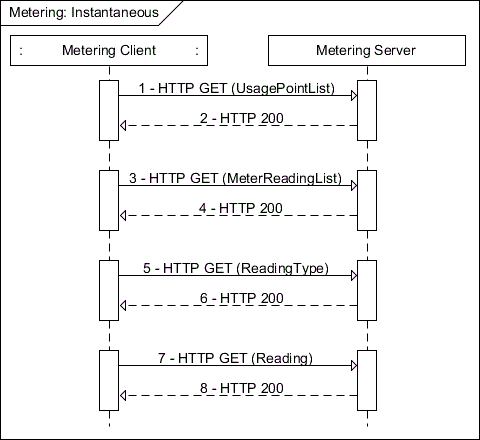
This is a use case where a Metering function set client (e.g., in-premises display) queries an instantaneous watts reading from a usage point.
Figure C.12—Metering instantaneous
NOTE—In most cases, registration is required to obtain access to metering.
Table C.14—POX example: Metering instantaneous
Step | Description |
1 | Client GETs the UsagePointList from the Metering server. Note: If directed through FunctionSetAssignments to a particular UsagePoint, these first two steps would be skipped. Client sends the following request: GET /upt HTTP/1.1 Host: {hostname} Accept: application/sep+xml |
2 | Metering server replies with UsagePointList. A typical response looks like: HTTP/1.1 200 OK Content-Type: application/sep+xml Content-Length: {contentLength} <UsagePointList all="1" href="/upt" results="1" subscribable="0" xmlns="urn:ieee:std:2030.5:ns"> <UsagePoint href="/upt/0"> <mRID>0B00006CC8</mRID> <description>Usage Point</description> <roleFlags>12</roleFlags> <serviceCategoryKind>0</serviceCategoryKind> <status>1</status> <MeterReadingListLink all="6" href="/upt/0/mr"/> </UsagePoint> </UsagePointList> |
3 | Client GETs the MeterReadingList from the Metering server. Note: This and the next three steps may be repeated for each page required to read the entire list. For this example, we are requesting up to ten MeterReadings at a time. Subsequent GETs would increment the “s” query parameter by ten or however many list items are returned. Client sends the following request: GET /upt/0/mr?s=0&l=10 HTTP/1.1 Host: {hostname} Accept: application/sep+xml |
Table C.14—POX example: Metering instantaneous (continued) | |
Step | Description |
4 | Metering server replies with up to ten MeterReading instances. Only six are returned in this case as indicated by the MeterReadingListLink “all” attribute in step 2. A typical response looks like: HTTP/1.1 200 OK Content-Type: application/sep+xml Content-Length: {contentLength} <MeterReadingList all="6" href="/upt/0/mr" results="6" subscribable="0" xmlns="urn:ieee:std:2030.5:ns"> <MeterReading href="/upt/0/mr/5"> <mRID>1500006CC8</mRID> <description>Instantaneous Reading for VAR’s</description> <ReadingLink href="/upt/0/mr/5/r"/> <ReadingTypeLink href="/upt/0/mr/5/rt"/> </MeterReading> <MeterReading href="/upt/0/mr/4"> <mRID>1400006CC8</mRID> <description>Instantaneous Reading for Wh</description> <ReadingLink href="/upt/0/mr/4/r"/> <ReadingTypeLink href="/upt/0/mr/4/rt"/> </MeterReading> <MeterReading href="/upt/0/mr/3"> <mRID>1200006CC8</mRID> <description>Interval Reading for VAR’s</description> <ReadingSetListLink all="24" href="/upt/0/mr/3/rs"/> <ReadingTypeLink href="/upt/0/mr/3/rt"/> </MeterReading> <MeterReading href="/upt/0/mr/2"> <mRID>1000006CC8</mRID> <description>Interval Reading for Wh</description> <ReadingSetListLink all="24" href="/upt/0/mr/2/rs"/> <ReadingTypeLink href="/upt/0/mr/2/rt"/> </MeterReading> <MeterReading href="/upt/0/mr/1"> <mRID>0E00006CC8</mRID> <description>Cumulative Reading for VAR’s</description> <ReadingLink href="/upt/0/mr/1/r"/> <ReadingSetListLink all="1" href="/upt/0/mr/1/rs"/> <ReadingTypeLink href="/upt/0/mr/1/rt"/> </MeterReading> <MeterReading href="/upt/0/mr/0"> <mRID>0C00006CC8</mRID> <description>Cumulative Reading for Wh</description> <ReadingLink href="/upt/0/mr/0/r"/> <ReadingSetListLink all="1" href="/upt/0/mr/0/rs"/> <ReadingTypeLink href="/upt/0/mr/0/rt"/> </MeterReading> </MeterReadingList> |
5 | Client GETs the ReadingType from the Metering server. Note: Step 5 and step 6 may be repeated for each MeterReading returned in step 4 to identify the MeterReading of interest by iterating through the MeterReadings returned in step 4. Client sends the following request: GET /upt/0/mr/4/rt HTTP/1.1 Host: {hostname} Accept: application/sep+xml |
Table C.14—POX example: Metering instantaneous (continued) | |
Step | Description |
6 | Metering server replies with ReadingType. A typical response looks like: HTTP/1.1 200 OK Content-Type: application/sep+xml Content-Length: {contentLength} <ReadingType href="/upt/0/mr/4/rt" xmlns="urn:ieee:std:2030.5:ns"> <accumulationBehaviour>12</accumulationBehaviour> <commodity>1</commodity> <dataQualifier>0</dataQualifier> <flowDirection>1</flowDirection> <kind>12</kind> <numberOfConsumptionBlocks>0</numberOfConsumptionBlocks> <numberOfTouTiers>0</numberOfTouTiers> <phase>40</phase> <powerOfTenMultiplier>3</powerOfTenMultiplier> <uom>38</uom> </ReadingType> Note: Once the desired ReadingType is identified we proceed to the next step. |
7 | Client GETs the Reading from the Metering server. Note: Because the instantaneous value is in the resource indicated in the ReadingLink of MeterReading we can read that resource. Client sends the following request: GET /upt/0/mr/4/r HTTP/1.1 Host: {hostname} Accept: application/sep+xml |
8 | Metering server replies with the Reading. A typical response looks like: HTTP/1.1 200 OK Content-Type: application/sep+xml Content-Length: {contentLength} <Reading href="/upt/0/mr/4/r" xmlns="urn:ieee:std:2030.5:ns"> <value>14</value> </Reading> Note: Subsequent reads of this URI will return more recent data. If a GET fails on this resource, then this entire procedure would be repeated to reestablish the correct URI. |