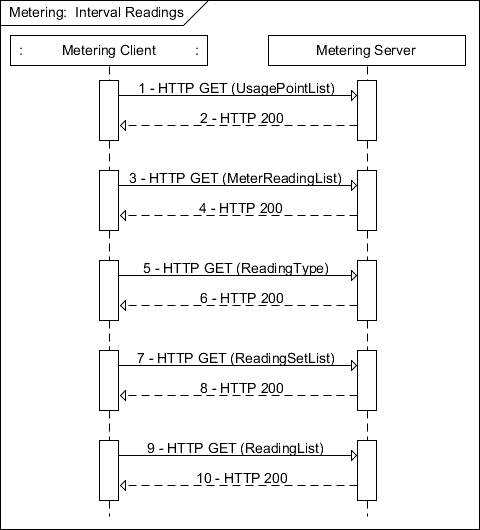
This is a use case where a Metering function set client (e.g., in-premises display) queries for a specific set of interval readings from a usage point. For this example, we will assume that the meter is configured for 5-minute intervals.
Figure C.11—Metering interval
NOTE—In most cases, registration is required to obtain access to metering.
Table C.13—POX example: Metering interval
Step | Description |
1 | Client GETs the UsagePointList from the Metering server. Note: If directed through FunctionSetAssignments to a particular UsagePoint, these first two steps would be skipped. Client sends the following request: GET /upt HTTP/1.1 Host: {hostname} Accept: application/sep+xml |
2 | Metering server replies with UsagePointList. A typical response looks like: HTTP/1.1 200 OK Content-Type: application/sep+xml Content-Length: {contentLength} <UsagePointList all="1" href="/upt" results="1" subscribable="0" xmlns="urn:ieee:std:2030.5:ns"> <UsagePoint href="/upt/0"> <mRID>0B00006CC8</mRID> <description>Usage Point</description> <roleFlags>12</roleFlags> <serviceCategoryKind>0</serviceCategoryKind> <status>1</status> <MeterReadingListLink all="6" href="/upt/0/mr"/> </UsagePoint> </UsagePointList> |
3 | Client GETs the MeterReadingList from the Metering server. Note: This and the next three steps may be repeated for each page required to read the entire list. For this example, we are requesting up to ten MeterReadings at a time. Subsequent GETs would increment the “s” query parameter by ten or however many list items are returned. Client sends the following request: GET /upt/0/mr?s=0&l=10 HTTP/1.1 Host: {hostname} Accept: application/sep+xml |
Table C.13—POX example: Metering interval (continued) | |
Step | Description |
4 | Metering server replies with up to ten MeterReadingList instances. Only six are returned in this case as indicated by the MeterReadingListLink “all” attribute in step 2. A typical response looks like: HTTP/1.1 200 OK Content-Type: application/sep+xml Content-Length: {contentLength} <MeterReadingList all="6" href="/upt/0/mr" results="6" subscribable="0" xmlns="urn:ieee:std:2030.5:ns"> <MeterReading href="/upt/0/mr/5"> <mRID>1500006CC8</mRID> <description>Instantaneous Reading for VAR’s</description> <ReadingLink href="/upt/0/mr/5/r"/> <ReadingTypeLink href="/upt/0/mr/5/rt"/> </MeterReading> <MeterReading href="/upt/0/mr/4"> <mRID>1400006CC8</mRID> <description>Instantaneous Reading for Wh</description> <ReadingLink href="/upt/0/mr/4/r"/> <ReadingTypeLink href="/upt/0/mr/4/rt"/> </MeterReading> <MeterReading href="/upt/0/mr/3"> <mRID>1200006CC8</mRID> <description>Interval Reading for VAR’s</description> <ReadingSetListLink all="24" href="/upt/0/mr/3/rs"/> <ReadingTypeLink href="/upt/0/mr/3/rt"/> </MeterReading> <MeterReading href="/upt/0/mr/2"> <mRID>1000006CC8</mRID> <description>Interval Reading for Wh</description> <ReadingSetListLink all="24" href="/upt/0/mr/2/rs"/> <ReadingTypeLink href="/upt/0/mr/2/rt"/> </MeterReading> <MeterReading href="/upt/0/mr/1"> <mRID>0E00006CC8</mRID> <description>Cumulative Reading for VAR’s</description> <ReadingLink href="/upt/0/mr/1/r"/> <ReadingSetListLink all="1" href="/upt/0/mr/1/rs"/> <ReadingTypeLink href="/upt/0/mr/1/rt"/> </MeterReading> <MeterReading href="/upt/0/mr/0"> <mRID>0C00006CC8</mRID> <description>Cumulative Reading for Wh</description> <ReadingLink href="/upt/0/mr/0/r"/> <ReadingSetListLink all="1" href="/upt/0/mr/0/rs"/> <ReadingTypeLink href="/upt/0/mr/0/rt"/> </MeterReading> </MeterReadingList> |
5 | Client GETs the ReadingType from the Metering server. Note: Step 5 and step 6 may be repeated for each MeterReading returned in step 4 to identify the MeterReading of interest by iterating through the MeterReadings returned in step 4. Client sends the following request: GET /upt/0/mr/0/rt?s=0&l=1 HTTP/1.1 Host: {hostname} Accept: application/sep+xml |
Table C.13—POX example: Metering interval (continued) | |
Step | Description |
6 | Metering server replies with ReadingType. A typical response looks like: HTTP/1.1 200 OK Content-Type: application/sep+xml Content-Length: {contentLength} <ReadingType href="/upt/0/mr/0/rt" xmlns="urn:ieee:std:2030.5:ns"> <accumulationBehaviour>9</accumulationBehaviour> <commodity>1</commodity> <dataQualifier>0</dataQualifier> <flowDirection>1</flowDirection> <kind>12</kind> <numberOfConsumptionBlocks>1</numberOfConsumptionBlocks> <numberOfTouTiers>4</numberOfTouTiers> <phase>40</phase> <powerOfTenMultiplier>3</powerOfTenMultiplier> <uom>72</uom> </ReadingType> Note: Once the desired ReadingType is identified we proceed to the next step. |
7 | Client GETs the ReadingSetList from the Metering server. Note: Because a particular historic sequence of values is desired, you would traverse the ReadingSetList looking for the ReadingSet with the timePeriod that encompasses the starting time of the range of intervals of interest. Client sends the following request: GET /upt/0/mr/2/rs?s=0&l=4 HTTP/1.1 Host: {hostname} Accept: application/sep+xml |
Table C.13—POX example: Metering interval (continued) | |
Step | Description |
8 | Metering server replies with ReadingSetList with the ReadingSet of interest. A typical response looks like: HTTP/1.1 200 OK Content-Type: application/sep+xml Content-Length: {contentLength} <ReadingSetList all="24" href="/upt/0/mr/2/rs" results="4" subscribable="0" xmlns="urn:ieee:std:2030.5:ns"> <ReadingSet href="/upt/0/mr/2/rs/2"> <mRID>2000006CC8</mRID> <description>Reading Set for WHrs</description> <timePeriod> <duration>3600</duration> <start>1338842400</start> </timePeriod> <ReadingListLink all="12" href="/upt/0/mr/2/rs/2/r"/> </ReadingSet> <ReadingSet href="/upt/0/mr/2/rs/4"> <mRID>2200006CC8</mRID> <description>Reading Set for WHrs</description> <timePeriod> <duration>3600</duration> <start>1338846000</start> </timePeriod> <ReadingListLink all="12" href="/upt/0/mr/2/rs/4/r"/> </ReadingSet> <ReadingSet href="/upt/0/mr/2/rs/6"> <mRID>2400006CC8</mRID> <description>Reading Set for WHrs</description> <timePeriod> <duration>3600</duration> <start>1338849600</start> </timePeriod> <ReadingListLink all="12" href="/upt/0/mr/2/rs/6/r"/> </ReadingSet> <ReadingSet href="/upt/0/mr/2/rs/8"> <mRID>2600006CC8</mRID> <description>Reading Set for WHrs</description> <timePeriod> <duration>3600</duration> <start>1338853200</start> </timePeriod> <ReadingListLink all="12" href="/upt/0/mr/2/rs/8/r"/> </ReadingSet> </ReadingSetList> |
9 | Once the ReadingSet that encompasses the starting time is identified, the client would GET the ReadingList from the Metering server. Note: To identify the interval that has the desired start time the client would GET the reading set. Client sends the following request: GET /upt/0/mr/2/rs/4/r?s=0&l=12 HTTP/1.1 Host: {hostname} Accept: application/sep+xml |
Table C.13—POX example: Metering interval (continued) | |
Step | Description |
10 | Metering server replies with ReadingList. A typical response looks like: HTTP/1.1 200 OK Content-Type: application/sep+xml Content-Length: {contentLength} <ReadingList all="12" href="/upt/0/mr/2/rs/4/r" results="12" xmlns="urn:ieee:std:2030.5:ns"> <Reading href="/upt/0/mr/2/rs/4/r/0"> <value>1163</value> <localID>00</localID> </Reading> <Reading href="/upt/0/mr/2/rs/4/r/2"> <value>1162</value> <localID>01</localID> </Reading> <Reading href="/upt/0/mr/2/rs/4/r/4"> <value>1163</value> <localID>02</localID> </Reading> <Reading href="/upt/0/mr/2/rs/4/r/6"> <value>1163</value> <localID>03</localID> </Reading> <Reading href="/upt/0/mr/2/rs/4/r/8"> <value>1163</value> <localID>04</localID> </Reading> <Reading href="/upt/0/mr/2/rs/4/r/a"> <value>1163</value> <localID>05</localID> </Reading> <Reading href="/upt/0/mr/2/rs/4/r/c"> <value>1162</value> <localID>06</localID> </Reading> <Reading href="/upt/0/mr/2/rs/4/r/e"> <value>1163</value> <localID>07</localID> </Reading> <Reading href="/upt/0/mr/2/rs/4/r/10"> <value>1163</value> <localID>08</localID> </Reading> <Reading href="/upt/0/mr/2/rs/4/r/12"> <value>1163</value> <localID>09</localID> </Reading> <Reading href="/upt/0/mr/2/rs/4/r/14"> <value>1162</value> <localID>0A</localID> </Reading> <Reading href="/upt/0/mr/2/rs/4/r/16"> <value>1163</value> <localID>0B</localID> </Reading> </ReadingList> The client would then walk the list starting at the “start” time in the timePeriod of the ReadingSet and adding, for Readings that specify their timePeriod, the duration, or for Readings that don’t specify their timePeriod, the intervalLength from ReadingType. If all intervals of interest are not contained in the current reading set, then we repeat the last two steps to get the additional data. If the information gathered in step 7 is exhausted, then you need to loop back to step 7 to GET the next set of ReadingSets. |